
Setup & connection
Does linking Tradovate in the TradingView Trading Panel automate Pine strategies?
The native broker connection supports placing account orders from TradingView. A chart strategy needs a separate execution workflow for its alerts. The webhook carries the instruction to the configured service, which routes supported orders to the selected Tradovate account. Read the workflow guide.
Is T2T an official Tradovate or TradingView website?
No. T2T is an independent guide to this workflow. It does not represent Tradovate or TradingView, provide a broker account or operate a trading checkout.
Do I need a Tradovate account before testing?
You need access to the intended permitted Demo or trading account. The execution connection uses that existing account; T2T does not create a brokerage account or grant trading permission.
What is the difference between Tradovate Login and API Access?
Login uses the regular account credentials and the chosen environment. The separate API Access path uses dedicated API credentials and identifiers. Use the corresponding form fields, and confirm eligibility for your account. See the connection choices.
Do all connections require my own paid API key?
Tradovate publishes eligibility and add-on rules for generating a personal API key. A third-party connection can offer a different authorization path. Confirm the method, account permission and fee for your exact route rather than treating personal-key requirements as universal.
Can I use Demo before Live?
Yes, when your chosen account and connection support Demo execution. Select Demo explicitly and verify the account identifier. A Demo fill tests the configuration; it does not establish Live permissions or guarantee matching live fills.
Can I choose a specific account under one Tradovate profile?
Specify or select the exact destination account when your profile exposes several accounts. Authentication identifies the profile; account selection determines where the order goes. Check the resulting account before sending an entry.
Alerts & JSON
Can an indicator trade automatically?
An indicator needs an alert event that describes a trading instruction. A plotted signal alone is insufficient. Use explicit buy/sell conditions or the indicator’s documented custom-message setup, with deliberate quantity and symbol.
What JSON fields are needed for a simple entry?
The minimal entry format uses ticker, order_action and order_contracts. A market example can also specify order_type. The URL determines the configured route; additional fields apply only to supported execution behavior. Use the JSON builder and examples.
Can I use strategy placeholders on an indicator alert?
Strategy placeholders describe strategy events. An indicator alert does not automatically provide that context. Use fixed values or the indicator’s documented dynamic-message logic instead.
Why are market_position and order.action different?
market_position describes the resulting long, short or flat state; order.action describes a simulated buy or sell. A sell can reduce a long rather than open a short. The builder uses explicit actions and does not generate a universal market-position template. Verify entry, close, partial-exit and reversal behavior separately.
Do backtest trades send live webhook orders?
Historical backtest orders do not generate new realtime strategy-alert notifications. A running alert acts on the saved strategy’s realtime events. Its broker-emulator fill remains separate from an actual Tradovate fill.
Must my computer or TradingView tab stay open?
Saved TradingView alerts run on its servers. A separate execution service processes the webhook route. Closing a chart tab does not cancel the alert; valid account access, subscriptions and service availability still matter.
Why does an alert keep using my old strategy settings?
TradingView saves the script, inputs and chart context when creating the alert. Later edits do not change that saved copy. Recreate the alert with the intended inputs, symbol and timeframe.
Does the JSON builder place a trade?
No. It formats and validates message text locally in your browser. It does not ask for credentials, call the broker or send a webhook. The separate dashboard Test Webhook action can place an order, so select Demo before using it.
Where should I enter my Tradovate password or API credentials?
Enter credentials in the corresponding execution-dashboard connection form. Keep them out of TradingView alert messages, shared JSON examples and screenshots. The webhook URL selects the configured route; the message describes the instruction.
Contracts & order behavior
Can I use ES1! or MES1! as an execution symbol?
These are continuous TradingView chart symbols. Verify whether your configured route resolves or maps the incoming symbol to the intended tradable expiry. Read the actual contract in the accepted Tradovate order. See the contract guide.
Can I send 0.01 contracts to trade a micro future?
No fractional-contract assumption belongs in a futures setup. A micro future is a smaller instrument multiplier, traded in whole contracts. Use an integer quantity and inspect the route’s final sizing.
Are ES and MES the same risk at quantity one?
No. ES is $50 per index point per contract; MES is $5. NQ is $20 per point; MNQ is $2. These contract values exclude commissions and fees, and they are not margin requirements.
Does an accepted order mean it filled?
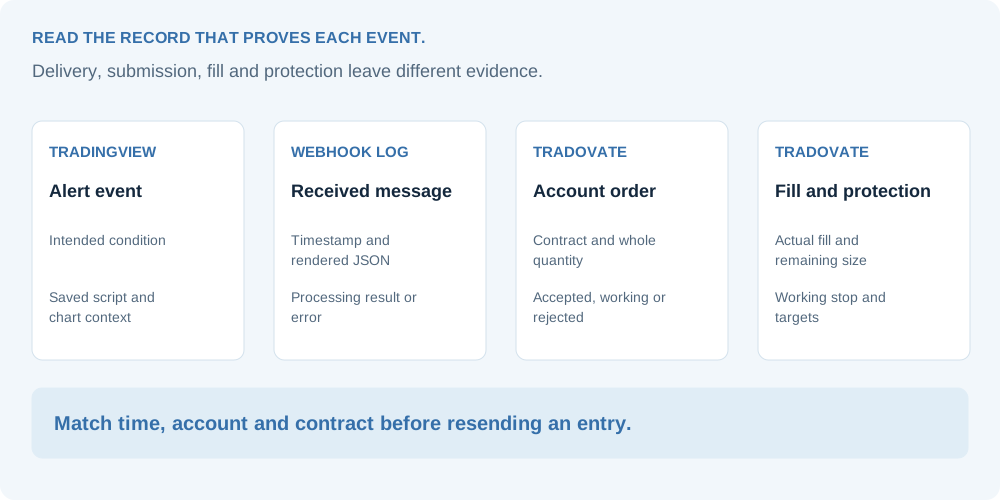
No. An accepted limit order can remain working, and an order can fill partially. Check order status, fill quantity and the resulting position in the account. Webhook delivery is an earlier event.
Are limit and stop entries available on every route?
Native Tradovate offers these order types, but connector and account support must be confirmed separately. The JSON page shows request formats with that distinction. Test the accepted order type, price and working status on your chosen route.
What must I check at rollover?
Review the outgoing and incoming expiry, any fixed symbol mapping, the TradingView alert context and open positions or working orders on the old contract. A continuous chart update does not by itself transfer account exposure.
Stops, targets & breakeven
Can the execution route create SL and TP for Tradovate?
Supported Tradovate workflows can create protective exits. Use the matching connection and documented fields, then check accepted protective prices and quantities in the account. Absolute prices and relative distances are different instructions.
Can I use three partial targets with one contract?
One contract cannot be divided into three fractional exits. An allocation of one contract at each of three targets needs three contracts. Check the actual allocation and any rounding in your selected workflow.
Does breakeven after TP1 apply to every TradingView JSON?
A basic buy/sell message does not enable breakeven automatically. Supported TP1-fill workflows can amend the remaining stop. Verify the source settings, actual TP1 fill and accepted amendment on the still-open contracts.
Should the strategy and connector both manage exits?
Use one clear owner of exits unless you have configured and tested a coordinated lifecycle. A strategy close plus an unrelated working target can leave an unintended order. Read the exit-management guide.
Does a breakeven stop guarantee no loss?
No. An entry-price stop does not cover commissions, exchange fees or slippage. Its actual execution can differ from the requested level.
Account scope & pricing
Does this support every evaluation and funded account?
No universal permission is promised. The firm decides whether your exact account, stage and connection method can use automated execution, API access or trade copying. Confirm its current rules directly. Use the prop-account questions.
Can one regular webhook trade on several accounts?
One regular webhook belongs to one trading account and can receive many alerts and symbols for that account. Additional account execution needs configured Trade Copier / Clone Mode routes. Reusing an ordinary UID does not configure a second account.
What is the current TradingView automation price?
The alert-automation subscription is $9 per month or $90 per year, checked on 11 October 2026, with a 14-day trial for the regular workflow. This is the execution-service price, not a TradingView subscription. Broker, data and applicable API fees are separate. Read the complete pricing scope.
Why did my alert fire without producing the expected order?
Find the last successful stage: TradingView event, webhook delivery, route processing, broker submission, fill or protection. Use the timestamp and full processing error to narrow the cause. Check the account before resending an entry. Start the troubleshooting guide.