
Four symbols, four different exposures
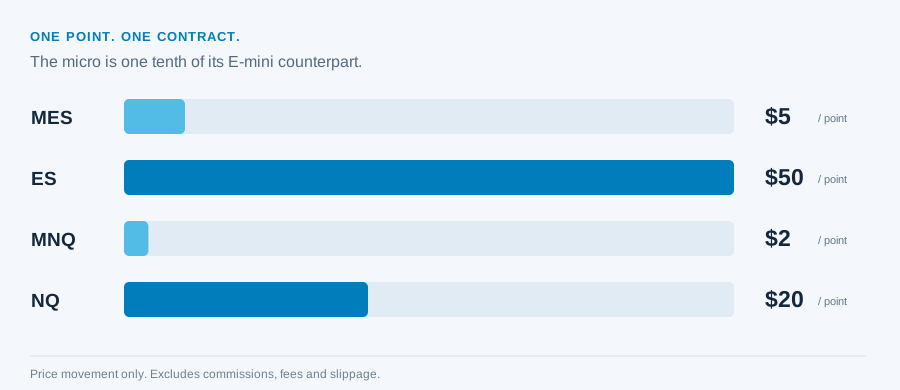
A micro contract and its E-mini counterpart can follow the same index while carrying very different dollar exposure. A webhook containing one contract means one of the selected instrument. It does not normalize MES and ES, or MNQ and NQ, to the same risk.
| Symbol | Index family | Value per point | Outright tick | Value per tick |
|---|---|---|---|---|
| MES | Micro E-mini S&P 500 | $5 | 0.25 points | $1.25 |
| ES | E-mini S&P 500 | $50 | 0.25 points | $12.50 |
| MNQ | Micro E-mini Nasdaq-100 | $2 | 0.25 points | $0.50 |
| NQ | E-mini Nasdaq-100 | $20 | 0.25 points | $5.00 |
A tick is not a point, and neither is a price
A point is one full index-price unit. A tick is the smallest permitted price increment for the specified contract and order context. For the outright contracts above, one point contains four 0.25-point ticks.
A 20-point distance is 80 ticks. The price level itself might be 6000, but 6000 is not the stop distance.
The calculation shows price movement only. It excludes commissions, exchange fees and slippage, and it does not establish the required margin. Margin permits exposure; it is not a maximum loss.
When a field asks for an absolute stop price, supply the level. When a documented workflow asks for a relative distance, confirm whether it uses points, ticks or another interpretation. Do not bring an MT5 pip assumption into a futures route.
Continuous chart symbols are not an expiry
Symbols such as ES1! and MNQ1! let TradingView display a continuous futures series. That series is useful for analysis. A tradable order still needs the contract recognized by the destination account.
For example, MESZ6 denotes a December 2026 MES contract in a common futures-symbol style: MES is the root, Z is December and 6 denotes the year in that notation. This is an educational example, not a claim that it is the current front month or the exact symbol every account accepts.
| Chart or source notation | Execution question |
|---|---|
MES1! | Which expiry does this configured route resolve it to? |
CME_MINI:ES1! | Does the route expect a prefix, a stripped ticker or an explicit mapping? |
MESZ6 | Is that expiry available and tradable in the selected account? |
MES | Does the connector resolve a root symbol, or require an expiry? |
Read the actual contract on the accepted Tradovate order. It is the simplest way to confirm the result of mapping rather than guessing from the chart label.
Map the incoming symbol deliberately
The dashboard’s Symbol Mapping uses FROM:TO: the left-hand value is the incoming symbol and the right-hand value is the destination symbol. Use the exact ticker emitted by your TradingView alert and a destination contract verified in Tradovate.
MES1!:MESZ6This example maps a continuous ticker to a fixed December 2026 expiry. A fixed mapping stays fixed until changed. Confirm the destination format and update it as part of rollover planning; do not leave an old expiry in place merely because the chart continued updating.
Check the incoming message first. MNQ1! and MNQ!1 are different strings. A mapping with the wrong order of characters may never match the alert.
Rollover changes the contract, not the whole trading account
The selected equity-index contracts use quarterly expiry cycles. CME month codes include H for March, M for June, U for September and Z for December. The relevant expiry, liquidity and broker rules determine the contract you choose to trade.
A continuous chart can switch its underlying contract or adjust historical prices. That does not automatically amend a fixed symbol mapping, transfer an open position or replace working orders. Keep the chart context and account contract aligned.
- Read the outgoing and incoming contracts. Confirm availability and expiry in the account.
- Review mapping and alert context. Update any fixed contract instruction deliberately, and recreate saved TradingView alerts when their chart context changes.
- Check open exposure and working orders. Review the old contract independently before allowing new alerts to target another expiry.
Whole contracts make sizing and target allocation concrete
Use integer quantity for futures. 1 means one contract; 0.01 is not a micro-contract equivalent. Micro futures reduce the instrument’s multiplier, not the minimum unit to a fraction of a contract.
Dynamic strategy quantity needs the same scrutiny as a fixed number. Check what {{strategy.order.contracts}} actually emits, how the route applies any multiplier and how many contracts reach Tradovate. Then check how your exit plan divides that size.