
Separate the entry type from the exit plan
The entry determines how exposure begins. The exit plan determines how that exposure is reduced or closed. Both need deliberate instructions; an accepted entry is not evidence of a working protective stop.
| Native order concept | Price behavior | Automation check |
|---|---|---|
| Market | Requests execution at the available market; the fill price is not fixed. | Compare the actual fill with the alert’s reference price. |
| Limit | Requests the limit price or better, and may remain unfilled. | Verify route support, price, expiry, working status and cancellation behavior. |
| Stop | Triggers a market-style order when the specified stop condition is reached. | Confirm the trigger price and allow for slippage after triggering. |
| Stop-limit | Triggers a limit order, which may not fill. | Native Tradovate capability is separate from connector support; do not assume a generic STOP message is a stop-limit. |
Confirm the chosen entry type on the exact Tradovate execution connection. The JSON guide distinguishes request format from verified pending-order support.
Choose who controls exits
TradingView emits exit instructions
Your script decides when an exit event exists. The execution route receives that message and applies it to the destination position according to its configured behavior. Partial exits need deliberate sizing and position semantics.
The strategy’s simulated exit price is not a confirmed Tradovate fill. An exit alert also depends on the alert and delivery path remaining operational.
The route creates protective orders
The entry supplies supported protective parameters or uses the configured exit workflow. Working stop and target orders are then verified in the account.
Multi-target parsing and breakeven settings belong to the supported source and connector workflow. Do not assume a basic TradingView buy message enables them.
Combining the two methods requires a specific lifecycle plan. A strategy closing a position while an unrelated target remains working can leave an unintended order. Test the interaction instead of enabling both methods by default.
Check price, quantity and order linkage
A stop below a long entry or above a short entry expresses the intended direction of protection. Its working quantity must cover the exposure it is meant to close. After a partial fill or partial exit, inspect the remaining quantity again.
A bracket is a group of related entry and exit instructions. OCO means one-cancels-the-other: linked exits are meant to cancel the alternative when one executes. The actual broker and connector order structure determines this behavior. Seeing two orders on the screen is not proof that they are linked.
The native TradingView-to-Tradovate order panel has its own bracket rules. Check the orders created by your webhook route rather than assuming the native UI rules apply to it.
Multiple targets must fit the entry size
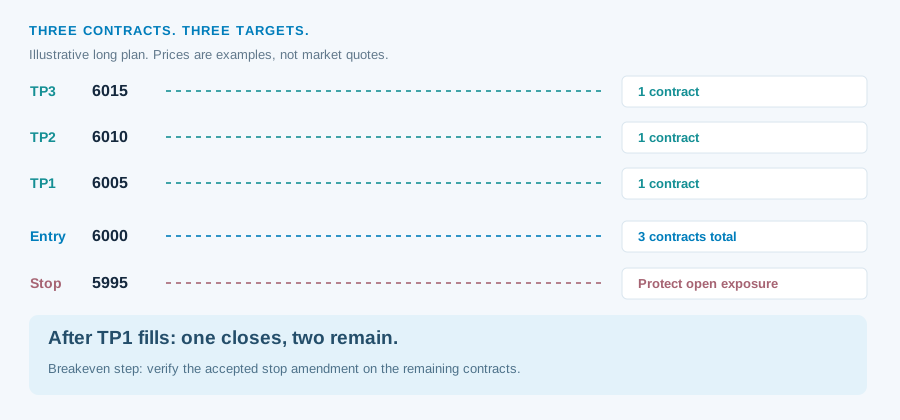
Futures cannot close fractions of a contract. A plan that exits one contract at TP1, one at TP2 and one at TP3 needs three contracts. Three targets applied to an entry of one contract do not create three fractional pieces.
| Entry size | Requested target plan | What to verify |
|---|---|---|
| 1 contract | Three separate partial exits | One contract cannot be split into three fractional exits. Choose a compatible plan. |
| 2 contracts | One at TP1, one at TP2 | Combined target quantity is two; verify the stop on the remaining contract after TP1. |
| 3 contracts | One at each of TP1, TP2 and TP3 | Combined target quantity is three, not three at every target. |
| 6 contracts | A deliberate 3 / 2 / 1 allocation | Arithmetic is valid; custom weighting still requires support in the chosen workflow. |
Multiple targets are documented for supported Tradovate execution flows. Telegram target parsing and TradingView strategy-generated exits use different configurations. Check the accepted entry total, each target’s quantity and all rounding before leaving the route unattended.
Breakeven after TP1 applies to what remains open
For a supported TP1-fill workflow, the first target closes its allocation. Breakeven then concerns the still-open contracts and their actual entry. In the three-contract illustration, TP1 removes one contract and two remain.
Confirm which event triggers the change. A simulated TradingView target event, a market reaching a plotted line and a broker-confirmed TP1 fill are different events. The remaining stop has moved only when Tradovate shows the accepted amendment at the intended level.
Breakeven after TP1 is documented for applicable execution flows. Verify the matching route settings instead of adding an undocumented breakeven field to any buy message. An entry-price stop also does not cover commissions, fees or slippage.
Keep account limits separate from signal instructions
The contract and stop plan manage trade exposure. Broker account controls and prop-firm rules may impose additional position limits, drawdown rules, cutoff times and instrument restrictions. A webhook does not override them.
Check the permitted contract count after any route multiplier. Review pending entries as well as open positions: a later fill can change exposure after you thought the signal had finished. Monitor the broker account independently of the strategy chart.
- The accepted entry type and contract are correct.
- The actual entry quantity matches the intended total.
- Working stop and target prices align with the contract’s tick size.
- Protective quantity matches the open exposure.
- Partial exits leave the intended remaining protection.
- Any breakeven amendment is accepted and visible.
- Closing the trade does not leave an unwanted working order.